
Included from Pro
Activity Log
The Activity Log records actions such as creating, editing, issuing or approving records, each with a name and a time. You can filter it, search it and export what you see to a CSV file. Only the account owner and admins can open it.

See it in one minute.
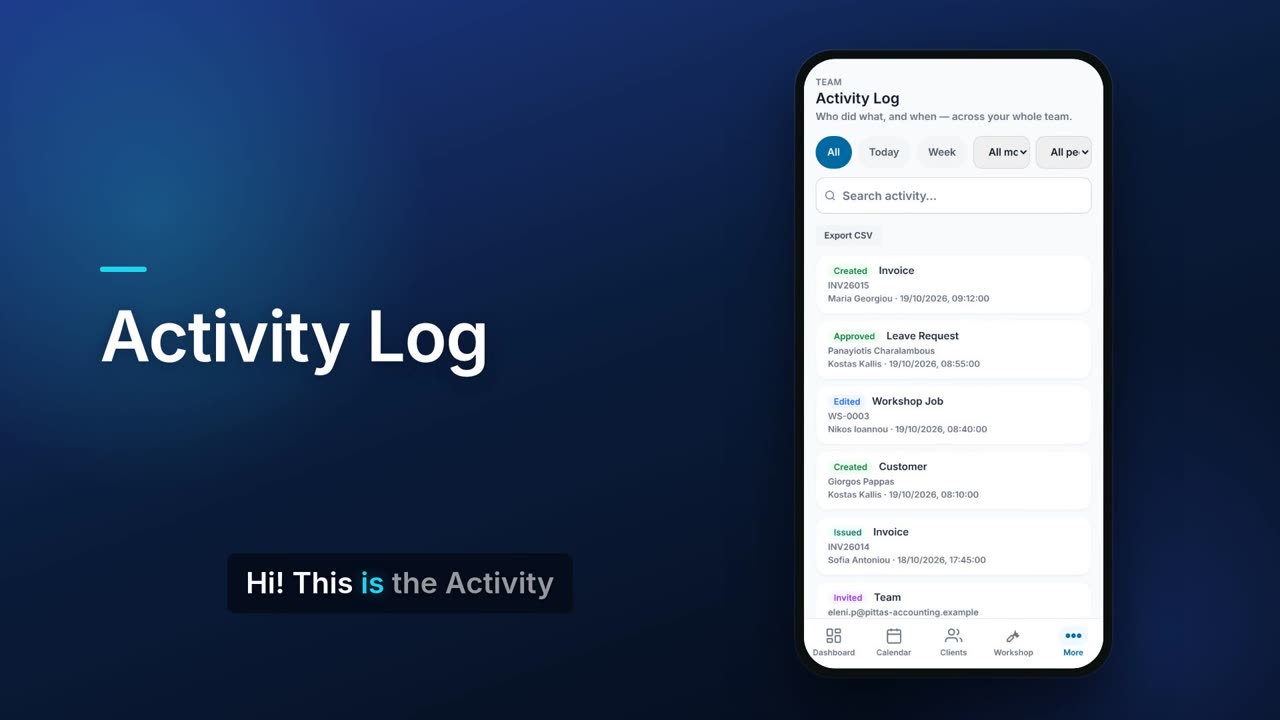
What it does.
Every action, name and time
Each entry shows the action, the type of record, a short summary, who did it and when.
Clear action labels
Actions are labelled, for example created, edited, deleted, issued, cancelled, shared, approved, invited, removed and job started or completed.
Today and this week
Switch between all entries, today only or the last seven days. Today follows your business's own time zone.
Filter by module
Narrow the log to one module. Only modules that have entries are offered.
Filter by person
See only what one member of your team did.
Search
Search the activity to find a particular record or change.
Export to CSV
Export exactly what is on screen, with your filters applied, to a CSV file.
Technician actions marked
Entries made by technicians carry a TECH tag.
Kept for a year
Entries older than a year are cleared automatically.
Owner and admins only
Other team members cannot open the log.
Real screens.
From the app, using a demo company.

Price.
Prices exclude VAT. See all CySo prices.
Works well with.
Try the Activity Log in CySo Flow.
Start on the free plan and switch modules on from inside the app.