
Included in every plan
Invoices
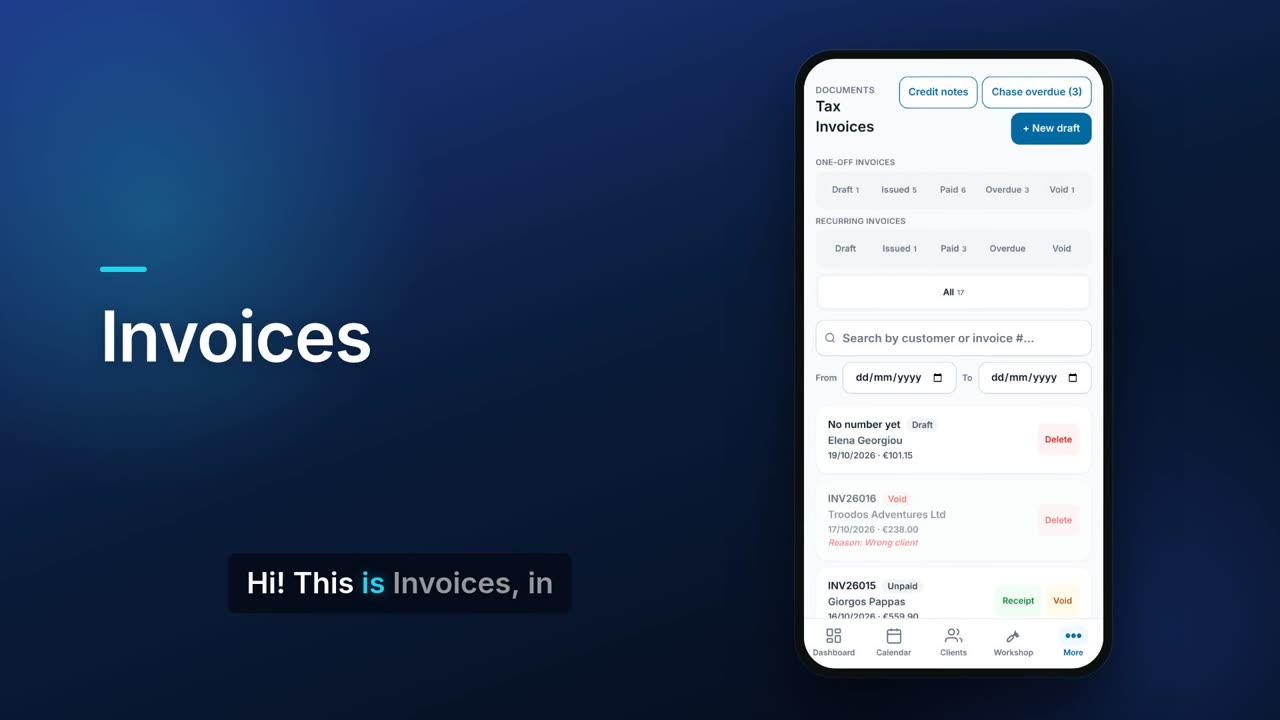
Invoices start as drafts and get their tax-invoice number only when you issue them. You record full or part payments, give the client a receipt, and correct mistakes with a credit note instead of editing an issued invoice. The free plan includes up to 10 tax invoices a month.

See it in one minute.
What it does.
Draft first, numbered on issue
Save an invoice as a draft. The tax-invoice number is taken only when you issue it, and an issued invoice is final. Staff get their invoice and receipt numbers from the server, so two people never get the same number.
One-off and recurring rows
Separate chip rows for one-off and recurring invoices, each split into Draft, Issued, Paid, Overdue and Void, with a count on each.
Due dates and overdue
Each invoice has a payment due date. The Overdue chip lists the invoices past it and how much is still due on each.
Search and date range
Search by customer or invoice number and narrow the list to a from and to date.
Part payments and receipts
Record a payment and the amount starts at the balance still due. Part payments add up, and Flow refuses a payment larger than what is owed.
Receipt PDFs
Choose one of five receipt templates and an accent colour, then download or share the receipt. With your own email (SMTP) set up you can also email it to the client.
Payment history
Open the list of every receipt recorded against an invoice.
Credit notes
Correct an issued invoice with a credit note that has its own number, names the invoice it corrects and states a reason. You can also give a general credit to a client, apply it to an unpaid invoice or record a refund, and download or share it as a PDF.
Void or reissue
Void an invoice with a reason and it stays in your records. Edit / reissue voids it and creates a corrected copy.
Document types and VAT treatment
Issue a tax invoice, a proforma or a reverse-charge invoice. Set the VAT treatment: standard, zero-rated, exempt, EU B2B goods or services, EU B2C distance sale (OSS) or out of scope.
Currencies, discounts and deposits
Invoice in another currency with its exchange rate, discount the whole invoice, require a deposit, or bill someone who is not a saved client.
Recurring invoices
With the Subscriptions module on (from Pro), set an invoice to repeat weekly, every two weeks, monthly, quarterly, every six months or yearly.
PDF, share and e-invoice
Reprint the PDF in English or Greek, or send it through your phone's share sheet. With the Accounting add-on you can also download an EN 16931 / Peppol UBL e-invoice (XML).
Chase overdue invoices
With your own email (SMTP) or SMS set up, one button sends a reminder for every overdue invoice.
Real screens.
From the app, using a demo company.


Price.
Prices exclude VAT. Paid plans have no invoice limit. See all CySo prices.
Included
The free plan includes up to 10 tax invoices a calendar month, and is unlimited for a new account's first 90 days. Drafts, proformas, credit notes, receipts and quotations do not count. Paid plans are unlimited. Recurring invoices need Subscriptions, from Pro.
Works well with.
Try Invoices in CySo Flow.
Start on the free plan and switch modules on from inside the app.