
Included from Pro
Team
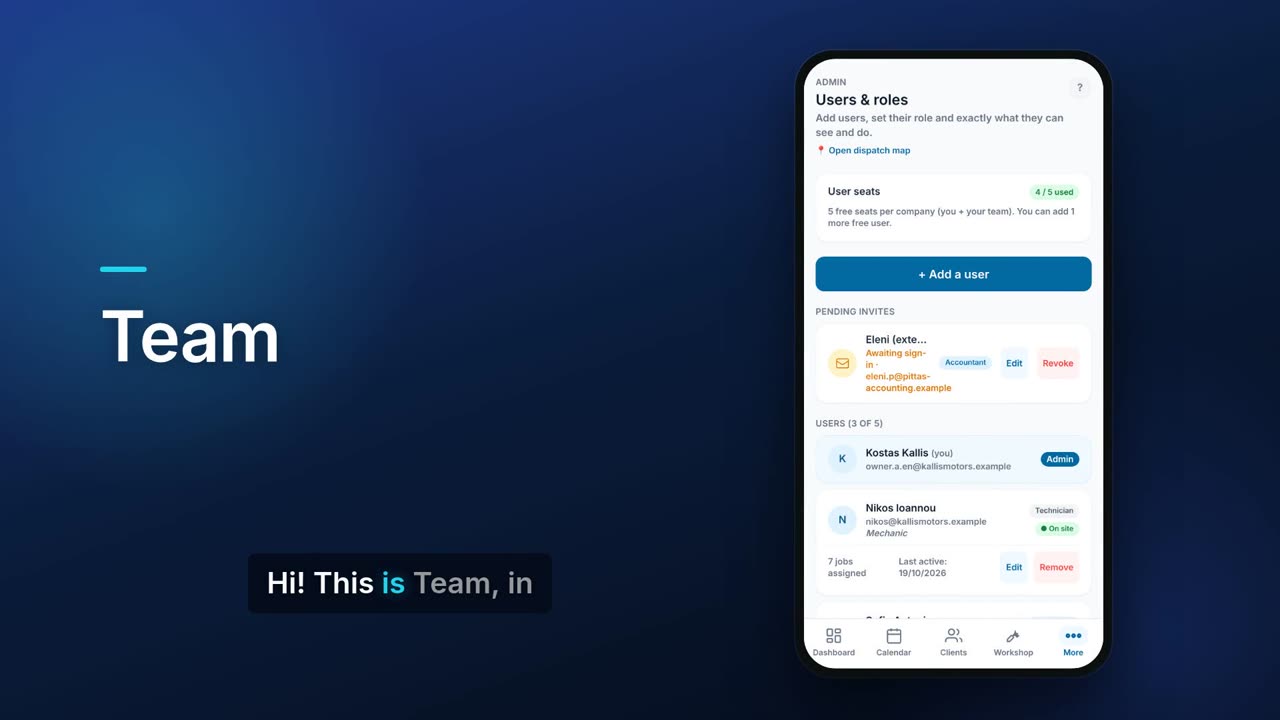
Team is where you add users, give each a role and fine-tune their access. Every person signs in with their own email. You can see seat usage, pending invites and, for each user, their role, whether they are on a job and how many jobs they have.

See it in one minute.
What it does.
Seat overview
See how many user seats you are using out of your plan's allowance, and how many more people you can add.
Add a user by email
Enter an email, an optional display name and a short description, such as their job title.
Role presets
Start from a ready role: Admin, Accountant, HR manager, Shop manager, Technician or Custom.
Per-area permissions
Choose view or edit access area by area, such as clients, invoices, stock or payroll.
Hide prices and amounts
Hide sale prices, cost prices and profit, invoice totals, revenue figures or client phone and email from a user.
Limit managers to locations
Shop managers and HR managers can be limited to the locations they run.
Shareable invite message
After each invite you get a ready message to share through any messaging app or copy, telling the person how to sign in and accept.
Manage pending invites
Edit the role of an invite that has not been accepted yet, or revoke it.
Status of each user
Each user shows their role, whether they are on site or offline, jobs assigned and when they were last active.
Edit or remove users
Change a user's name, role and permissions at any time, or remove them.
Buy extra seats on Teams
On the Teams plan you can buy extra seats when you reach your allowance.
Real screens.
From the app, using a demo company.


Price.
Prices exclude VAT. See all CySo prices.
Included
User seats count the account owner. Free and Starter: 1 user. Pro: 3 users. Teams: 5 users included, then extra seats at €18 per seat a month (€180 a year), up to 25 users.
Works well with.
Try Team in CySo Flow.
Start on the free plan and switch modules on from inside the app.