
Included from Starter
AI connector
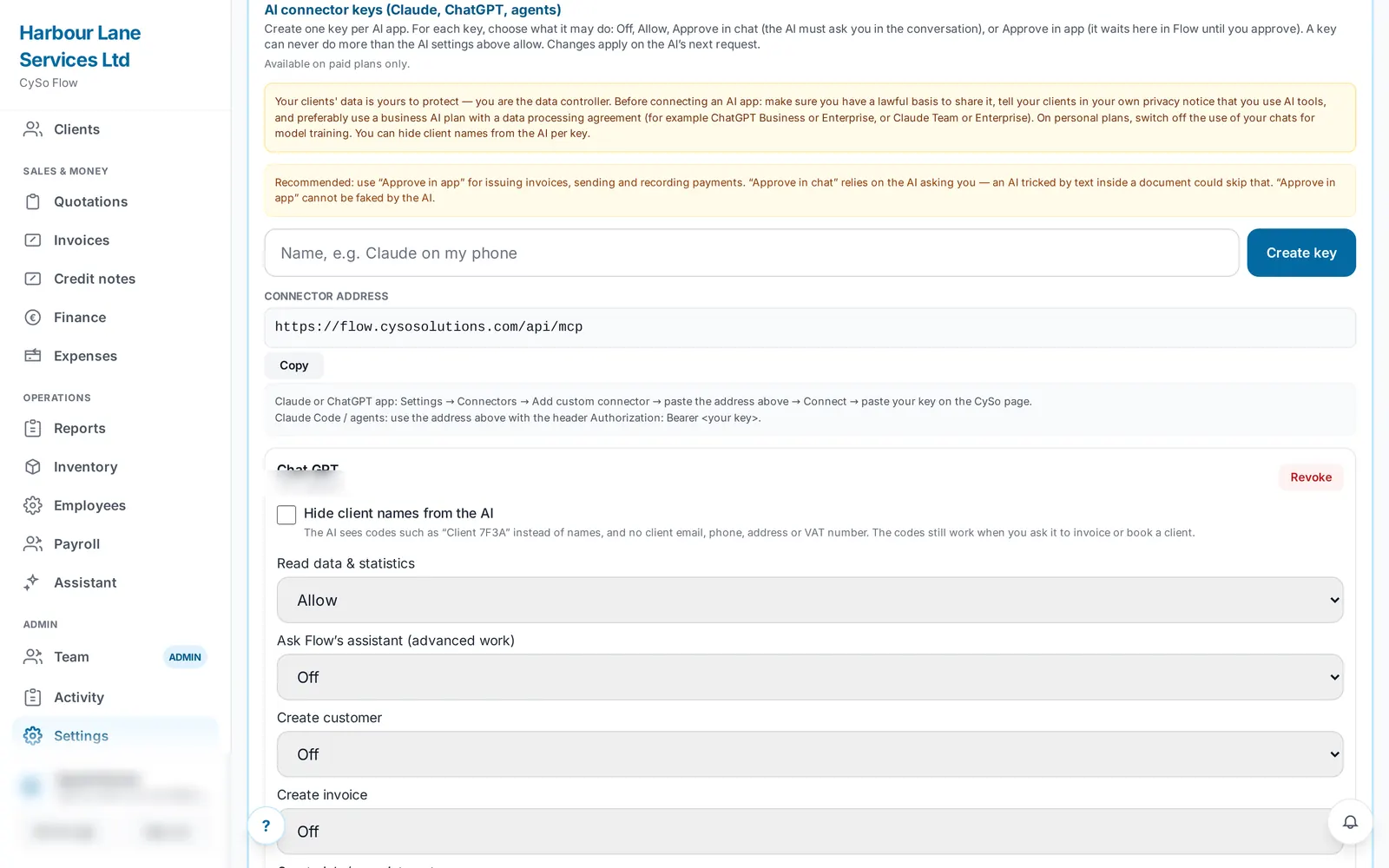
The AI connector lets an outside AI app such as ChatGPT or Claude read and work with your Flow data. You create a key per AI app and decide, action by action, whether it is off, allowed, needs your approval in the chat or needs your approval inside Flow. Customers, invoices, quotations, jobs and products work on any paid plan; accounts, VAT, shifts, staff and expenses also need the AI Assistant.
What it does.
Connect ChatGPT or Claude
Add Flow as a connector in the AI app, sign in with your normal Flow login and pick which of your keys it may use. No key or password is typed into the AI app.
Core tools on any paid plan
List and add customers, list, create, email and mark invoices paid, see sales statistics, create and send quotations, list and book jobs, and list products.
More with the AI Assistant
With the AI Assistant and the matching module, it can also read profit and loss, aged balances and VAT return figures, post a journal entry, file a VAT period, work with the rota, list expenses and staff, and hand a task to Flow's own assistant.
Per-key permissions
Each key has its own setting for every action: Off, Allow, Approve in chat or Approve in app. A key can never do more than your business-wide AI settings allow, and the stricter setting wins.
Confirmation before irreversible actions
Issuing an invoice, recording a payment, emailing an invoice or quotation, posting a journal entry and filing VAT always need your approval first, even if set to Allow.
Approve inside Flow
Actions set to Approve in app wait in Flow, and you are notified. Nothing runs until you tap Approve, and waiting requests expire after 24 hours.
Hide client names
Per key, the AI can see codes such as 'Client 7F3A' instead of names, with no client email, phone, address or VAT number. The codes still work when you ask it to invoice or book a client.
Staff details stay private
When the AI lists staff it sees only name, role, employee number and leave balance, never pay, tax or bank details.
Your switch, your key
Turn the connector off, change a key's permissions or revoke it at any time. Changes apply on the next request.
Price.
Prices exclude VAT. Available on every paid plan. See all CySo prices.
Included
No extra charge. Available on paid plans (Starter, Pro, Teams) to the owner or an admin. Accounts, VAT, shifts, staff, expenses and asking Flow's assistant also need the AI Assistant add-on (included in Teams) and the matching module. The AI app you connect processes the data under its own terms.
Works well with.
Try the AI connector in CySo Flow.
Start on the free plan and switch modules on from inside the app.