
Included from Pro
Subscriptions
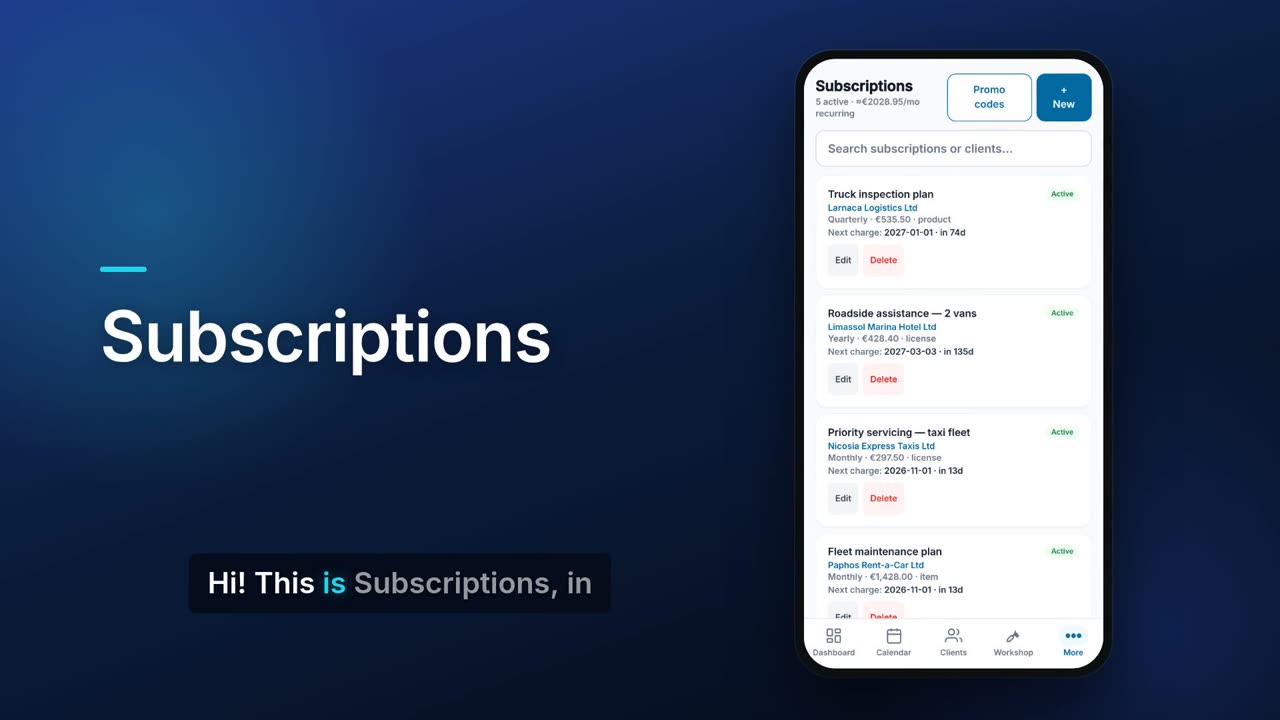
Set up a plan for a client with a price, an interval and a start date. Flow shows your monthly recurring total and when each plan will next be charged. Recurring invoices made with Repeats live here too, and the copies that are due are issued and numbered when you open Flow.

See it in one minute.
What it does.
Plans per client
Pick the client, an inventory item, a product or a licence, a price, a monthly, quarterly or yearly interval and a start date.
Monthly recurring total
See how many plans are active and roughly what they bring in per month. Quarterly and yearly prices are converted to a monthly figure.
Next charge date
Each plan shows its next charge date and how many days away it is. The form shows when the first charge would be before you save.
Active, paused or cancelled
Pause a plan or cancel it, and its status shows on the card.
Promo codes every cycle
Add a promo code to a plan. It is checked again each billing cycle before the discount is applied.
Recurring invoices
Invoices set to repeat in Invoices appear here on a schedule from weekly to yearly.
Edit the template
Change a recurring invoice's lines, subject or VAT, and the change applies to future copies only. You can also pause it until a date or stop it.
Issued when you open Flow
When you open or return to Flow, every copy that is due is created, issued and numbered, and Flow tells you how many. Running twice never makes a second copy.
Bill due button
If anything is due and not yet billed, a Bill due button creates those invoices in one go.
Search
Search your plans by name or client.
Real screens.
From the app, using a demo company.


Price.
Prices exclude VAT. Subscriptions issue invoices and do not charge cards. See all CySo prices.
Included
Included in the Pro and Teams plans at no extra cost. Subscriptions issue invoices; they do not charge cards.
Works well with.
Try Subscriptions in CySo Flow.
Start on the free plan and switch modules on from inside the app.