
Included from Pro
Inventory
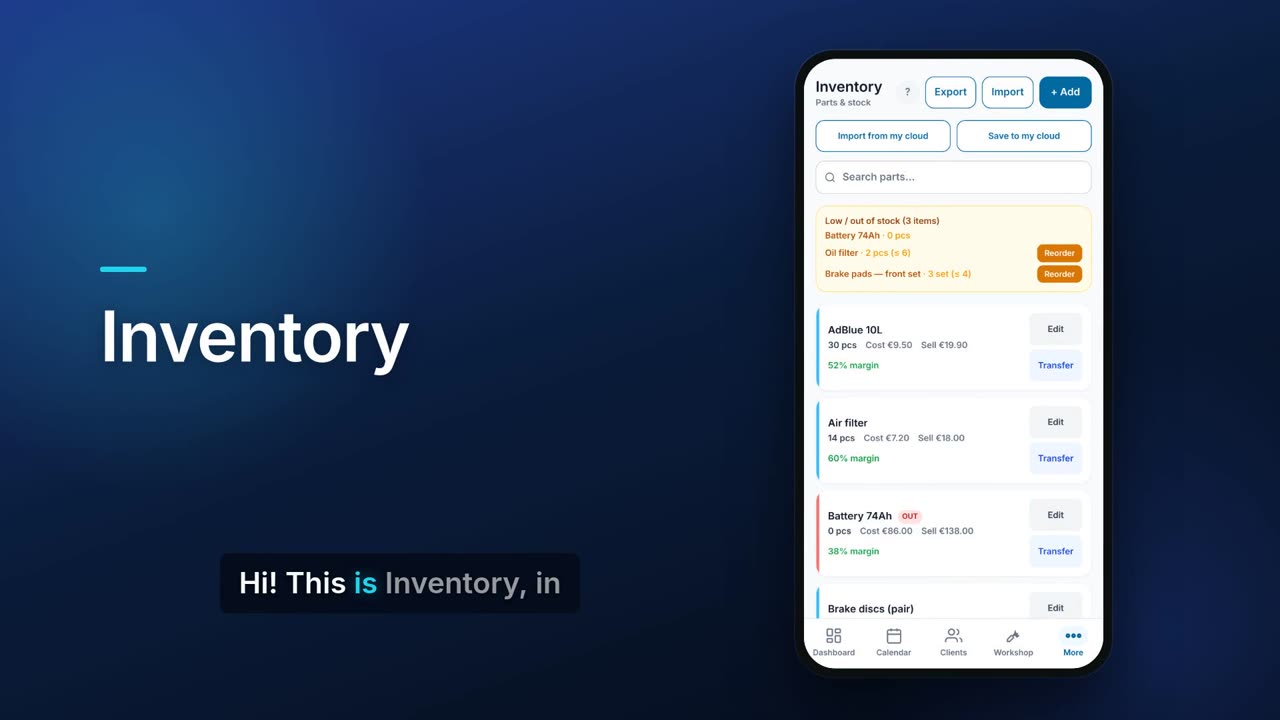
Inventory keeps one list of the parts and goods you hold, with quantities, cost and sell prices. It flags what is low or out of stock and lets you reorder from a supplier in one tap. It is the stock list that Workshop jobs and the POS till draw from.

See it in one minute.
What it does.
Low and out-of-stock warning
An amber banner at the top lists every item that is out of stock or at or below the level you set for it.
Cost, price and margin
Each part shows its quantity and unit, what you pay, what you charge and the margin. Red and amber marks show what is out or low.
Find a part by any number
Search by name, description, SKU, serial, brand, fitment, alternative numbers or a supplier's own part number.
Several suppliers per part
Record each supplier's part number, cost and lead time, mark one as preferred, and Flow shows you which is cheapest.
Cross-reference numbers
Add the other numbers the same part is sold under, so searching any of them finds it.
Brand, fitment and photo
Record who makes a part and what it fits (make, model, years), and add a photo of it.
One-tap reorder
For a low item with a supplier and reorder quantity set, Reorder creates a purchase order with a link the supplier uses to accept it. It is e-mailed when your e-mail sending is set up; otherwise you get the link to send yourself.
Move stock between locations
Transfer a quantity from one location to another, for example from the shop to a van, and the move is logged.
Excel import and export
Export the whole list to Excel, or import a sheet and choose to update matching parts or replace the list. Duplicate rows are combined.
Stock goes down as you sell
Paid sales at the POS till and parts used on Workshop jobs are taken off this list; a shortfall is recorded rather than going below zero.
Hide fields you do not use
Turn off SKU, serial number, location or cost price if your business does not need them.
Real screens.
From the app, using a demo company.


Price.
Prices exclude VAT. Choose Inventory or Warehouse, not both. See all CySo prices.
Included
Included in the Pro and Teams plans at no extra cost. Inventory and Warehouse cannot both be on: you choose one stock system, and switching moves your stock across.
Works well with.
Try Inventory in CySo Flow.
Start on the free plan and switch modules on from inside the app.